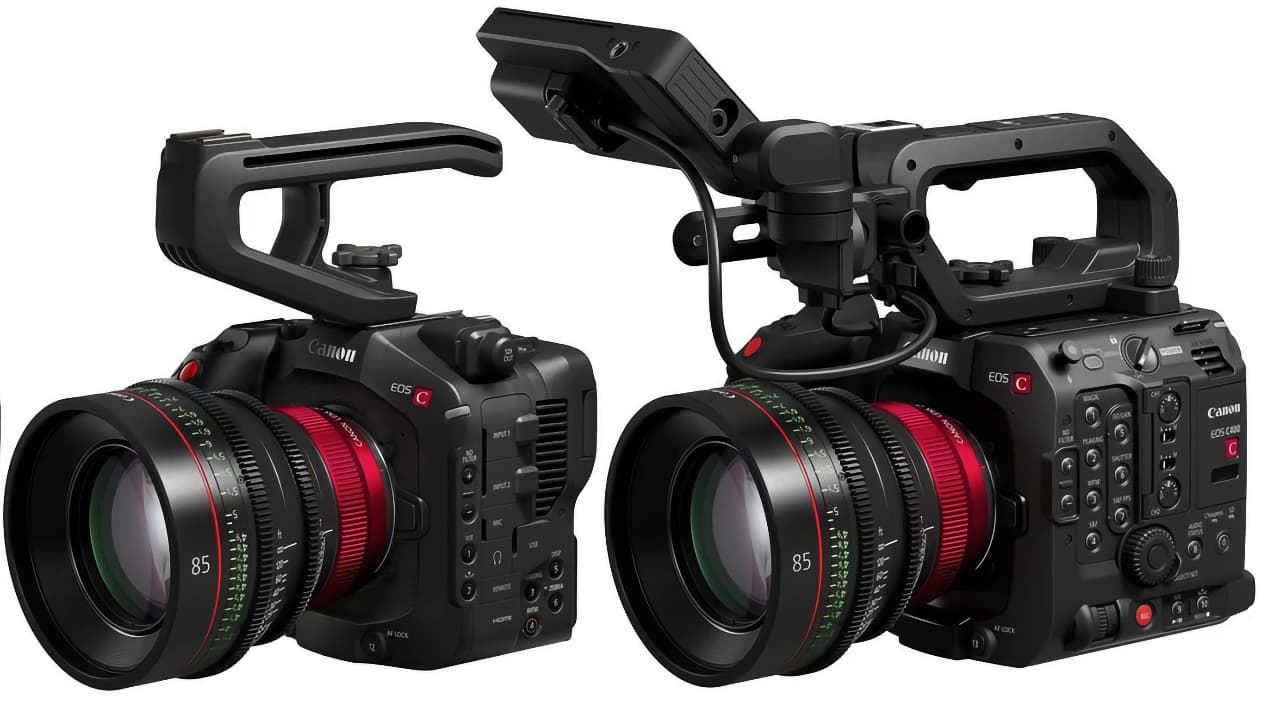
Image: Property of Canon
Canon has released a free firmware update for both the EOS C80 and EOS C400 cinema cameras, bringing a new Cinema Exposure Mode that promises up to 2 stops of improved highlight handling when shooting above base ISO. The update landed on August 19, 2026, and if you own either camera, it is worth installing before your next shoot.
Here is what the firmware actually does, which features are exclusive to the C400, and whether it changes the buying equation for creators considering these cameras.
The headline feature of firmware version 1.0.7.1 is Cinema Exposure Mode. Both the C80 and C400 get this. Canon describes it as a new capture mode that sits alongside the existing Custom Picture mode, and it does two things:
In practical terms, Cinema Exposure Mode lets you adjust the dynamic range balance between highlights and shadows based on your ISO setting. When you are shooting above base ISO (which is most of the time in real-world conditions), the camera allocates more of its dynamic range to preserving highlight detail rather than shadow noise. This is particularly useful for outdoor shoots where skies and bright windows tend to blow out.
The streamlined LOG menu is a quality-of-life improvement. Instead of digging through the full Custom Picture menu system to adjust your LOG settings, Cinema Exposure Mode presents a simplified interface focused on the parameters that matter for LOG shooting. Less menu diving on set means fewer missed shots.
While both cameras get Cinema Exposure Mode, the EOS C400 receives several additional features that the C80 does not:
This is designed for broadcast and live production environments where you are using Cine Servo lenses. When you zoom in or out, the exposure can shift because the effective aperture changes. Auto Exposure Ramping Compensation applies in-camera gain compensation based on the zoom position, keeping image brightness consistent through the zoom range.
Compatible lenses include:
The firmware adds support for the new CN30x40 IAS J/R1 (RF mount) and CN30x40 IAS J/P1 (PL mount) Cine Servo lenses. Both the C80 and C400 get this lens compatibility, but the C400 pairs it with the Auto Exposure Ramping Compensation feature for a more complete broadcast workflow.
Beyond Cinema Exposure Mode, both the C80 and C400 receive two additional improvements:
If you are weighing both cameras, here is a quick comparison of the key specifications:
| Feature | EOS C80 | EOS C400 |
|---|---|---|
| Sensor | 6K Full-Frame BSI Stacked CMOS | 6K Full-Frame BSI CMOS |
| Mount | RF | RF |
| Base ISO | 800, 3200, 12,800 | 800, 3200, 12,800 |
| Dynamic Range | Up to 16 stops | 16 stops |
| Max Resolution | 6K 30p Cinema RAW Light | 6K 60p RAW |
| 4K | Up to 120p | Up to 120p |
| Price (USD) | $5,499 | $7,999 |
| AE Ramping Comp. | No | Yes (with firmware 1.0.7.1) |
| Form Factor | Compact body | Box camera with extensive I/O |
The C400 commands a $2,500 premium over the C80, and for that you get 6K at 60p (vs 30p on the C80), a box-camera form factor with extensive interfaces for production rigs, and now Auto Exposure Ramping Compensation for broadcast workflows. The C80 is the better choice for solo operators and run-and-gun shooters who want a compact body with RF-mount flexibility.
If you own either camera, the answer is straightforward: yes, update immediately. The firmware is free, the installation is simple (download from Canon's website, put the file on an SD card, and follow the menu prompts), and the Cinema Exposure Mode alone is worth the 10 minutes it takes.
1. Download the firmware from Canon's official Cinema EOS support page (search for your camera model).
2. Copy the firmware file to a formatted SD card.
3. Insert the card into the camera and navigate to the firmware update option in the menu.
4. Follow the on-screen prompts. Do not power off during the update.
5. After installation, verify the firmware version shows 1.0.7.1 in the camera's system information screen.
I shoot tech reviews on a Canon R6, and while the Cinema EOS line is a different tier of camera, the philosophy behind this update is worth noting. Canon is giving existing owners a meaningful image-quality improvement for free rather than locking it behind a new camera body. That is the kind of support that builds loyalty.
The 2-stop highlight improvement is the feature that matters most in practice. Anyone who has shot LOG footage outdoors knows the pain of recovering blown skies in post. If Cinema Exposure Mode delivers even half of what Canon claims in real-world shooting, it will save time in color grading and give you more usable footage in challenging light.
For C400 owners working in broadcast or live production, the Auto Exposure Ramping Compensation is the bigger deal. Zoom-dependent exposure shifts have been a long-standing annoyance with Cine Servo lenses, and having the camera handle the compensation internally is a workflow improvement that eliminates a post-production headache.
What is Canon Cinema Exposure Mode?
Cinema Exposure Mode is a new capture mode in Canon's firmware version 1.0.7.1 for the EOS C80 and C400. It improves highlight performance when shooting above base ISO by up to 2 stops and provides a streamlined menu specifically for LOG shooting.
Is the Canon C80 and C400 firmware update free?
Yes, the firmware update is available as a free download from Canon's website starting August 19, 2026.
What does Auto Exposure Ramping Compensation do on the C400?
Auto Exposure Ramping Compensation applies in-camera gain compensation based on zoom position, maintaining consistent image brightness when using supported Cine Servo lenses in broadcast and live production environments.
Which lenses are compatible with the C400 firmware update?
The update adds compatibility with the CN30x40 IAS J/R1 (RF mount) and CN30x40 IAS J/P1 (PL mount) Cine Servo lenses. Auto Exposure Ramping Compensation also supports several existing Cine Servo lenses including the CN7x17, CN10x25, CN20x50, CN8x15, and CN5x11.
As an Amazon Associate I earn from qualifying purchases. Canon EOS C80 and C400 are available through authorized Canon dealers.