
I unplugged the camera from my MacBook, plugged the Lenkeng LKV488 transmitter into that same USB-C port, and mirrored the laptop to the TV across the room. The picture came up and it looked good. Then I moved the cursor, and the cursor on the television arrived noticeably after my hand did.
Disclosure: Lenkeng sent me this unit to test. They had no say in what I wrote and nothing here was checked with them first.
Does Wireless 4K HDMI Actually Work?
Yes, at the resolution it claims. What it does not do is work fast, and that is the whole review. Lenkeng rates the pair at 100 to 250 milliseconds, and a 60 Hz display draws a new frame every 16.7 ms, so the floor is six frames behind and the ceiling is fifteen. No amount of 4K sharpness fixes that, and no seller of a wireless HDMI kit puts it in the headline.
What that means in practice is a split verdict, not a bad product. Slides, a spreadsheet, a photograph, a web page on a wall: all fine, and it beats a cable you cannot run. A cursor you aim with, a game, anything timed by reaction: no. The pair is small, it wants 5 volts at each end, and once it is paired it stays paired.
Two honest uses where it earns the money. A meeting room where the HDMI cable has walked off again, and a camera-to-monitor run on a shoot where a director wants to see the frame without ten metres of cable taped across a floor.
What It Is, and What Comes in the Box
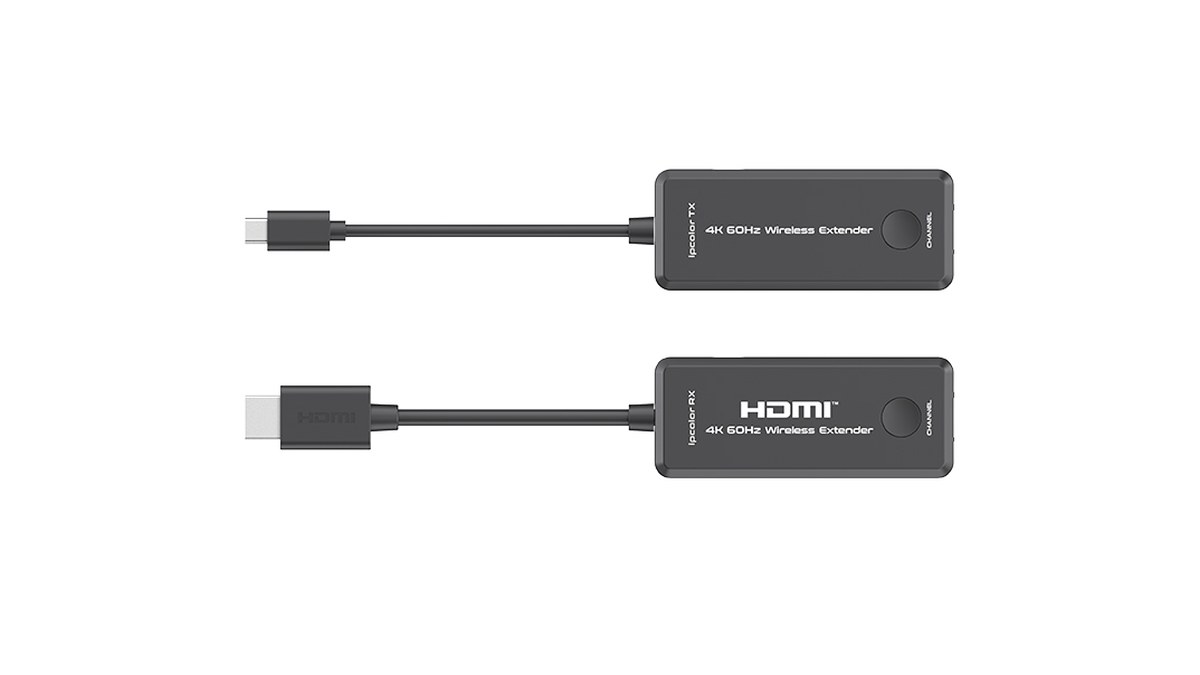
It is not a casting stick and not a dongle pretending to be a display. It is a two-piece extender: a transmitter that takes video in over USB-C, and a receiver that puts it back out over HDMI. Lenkeng calls it a 4K@60Hz TypeC wireless extender, including a transmitter and a receiver, and that is exactly what arrived.
| Item | What it is | Why it matters |
|---|---|---|
| Transmitter (TX) | USB-C input, 47 g | Plugs into the laptop, phone or tablet that owns the picture |
| Receiver (RX) | HDMI output, 54 g | Sits at the display and needs its own 5 V feed |
| Micro USB power cables | USB-A to Micro USB | The fix for a TV or source that cannot supply power over its own port |
Neither end needs support at those weights, and the transmitter is 15 mm thick, so it will not foul a laptop's neighbouring port in most cases. The receiver is the half that catches people out, because the display end almost never supplies the 5 V it needs.
Specs, and Where Lenkeng's Own Pages Disagree
Every figure comes from Lenkeng's own product pages, not a retail listing, and each is labelled for what it is. A manufacturer figure is a claim until somebody tests it.
| Spec | Lenkeng's figure | How solid it is |
|---|---|---|
| Resolution | 4096x2160 and 3840x2160 at 24, 30, 50 and 60 Hz; 1080p and 720p at 50 and 60 Hz; 1920x1200 at 60 Hz | Manufacturer claim |
| Chroma and bandwidth | YUV 4:4:4, 4:2:2 and RGB; HDMI 2.0, maximum 18 Gbps | Manufacturer claim |
| HDCP | 1.4 and 2.2 pass-through | Manufacturer claim, not tested by me |
| Radio and range | 5.18 to 5.24 GHz; 20 m (65.6 ft) line of sight | Manufacturer claim; I tested across one room, not at distance |
| Latency | 100 to 250 ms | Manufacturer claim, and my test agrees with the shape of it |
| Power | Micro USB 5 V/1 A at both ends; transmitter under 5 W, receiver under 3.5 W | Manufacturer claim |
| Transmitters per receiver | Up to 16 to 1 on the V1.0 page, "One to one" on the older page | Pages conflict; I tested one pair |
| Operating temperature | -20 to 60 C (-4 to 140 F) | Manufacturer claim |
The 18 Gbps row explains the shape of the product. HDMI 2.0 tops out at 18 Gbps, and 4K at 60 Hz with 8-bit 4:4:4 needs essentially all of it, so the claim sits at the edge of what the interface can carry with nothing in reserve. I did not run a test pattern or read the negotiated signal off the display's info screen, so the honest statement is that the image looked full resolution and clean, not that 4K60 at 4:4:4 was confirmed on my bench.
The 16-to-1 row is the one that made me slow down. The V1.0 page linked from my video says up to 16 transmitters to one receiver; an older LKV488TypeC page on the same site says one to one. Both are Lenkeng, I tested one pair, and you should treat 16-to-1 as a claim attached to a specific version rather than a promise attached to the name.
Pricing is equally awkward: there is no Canadian retail listing for the Type-C version I could verify, and the only number in the family is the HDMI version, the LKV488-V2.0, at 149.00 EUR from Cyprus retailers and 104.30 to 179.00 EUR at other European shops.
The Delay, in Milliseconds and in Frames
Lenkeng's 100 to 250 ms is a range, and where a room sits in it depends on the radio environment, distance and how busy 5 GHz is. Converted to frames, which is what you actually feel:
| Refresh rate | One frame lasts | 100 ms equals | 250 ms equals | What it feels like |
|---|---|---|---|---|
| 30 Hz | 33.3 ms | 3 frames | 7.5 frames | Visible on a cursor, tolerable for slides |
| 60 Hz | 16.7 ms | 6 frames | 15 frames | Aim and cursor feel detached |
| 120 Hz | 8.3 ms | 12 frames | 30 frames | Unusable for anything timed by reaction |
Fifteen frames at 60 Hz is a quarter of a second, which is the difference between moving a cursor and watching it move. A higher refresh panel makes the wireless gap worse in frame terms, not better, so there is no display upgrade that buys this back. If your work on that screen is timed by reaction, this is the wrong tool and no spec on the page changes it.
Setup, Tests and Power
This is the part I did on camera, written the way it happened. From cold, the pair came up in about 15 to 20 seconds. The transmitter took the MacBook over USB-C, the receiver went into the television, and the picture appeared without a pairing dance once the two ends had found each other.
Web pages and text were the pleasant surprise: sharp, and readable at a distance, which is the test that matters for a meeting room. Video played without stutter. The same transmitter also drove a phone, and the receiver took its power from the television's USB service port without complaint. When the chain cannot hold 4K60 it settles on a lower mode instead of going black, and 1080p and 1920x1200 are listed fallbacks, so a resolution drop is expected behaviour rather than a fault.
Power is the least interesting part and the most likely to ruin your first ten minutes. Both ends want Micro USB at 5 V and 1 A, the transmitter draws under 5 W and the receiver under 3.5 W, so a phone charger, a power bank or a powered hub all clear it easily. An unpowered hub that has to pass 5 V through is the case that fails, and the receiver at the display is the end that usually needs the cable.
One thing to plan around: the link uses 5.18 to 5.24 GHz, a narrow slice, and narrow slices are where interference complaints come from. Lenkeng's answer is SSID pairing plus a channel button, which is why first setup takes longer than plugging in a cable. I did not test at distance, so the 20 m figure is unverified by me.
Wireless HDMI vs a Cable vs a Casting Stick, and Who Should Buy It
| Lenkeng LKV488 | Long HDMI cable | Casting stick | |
|---|---|---|---|
| Added latency | 100 to 250 ms claimed, clearly visible in my test | None | None to slight, depends on the network |
| Maximum resolution | 4096x2160 at 60 Hz claimed, with 4:4:4 claimed | 18 Gbps over certified HDMI 2.0, so 4K60 with HDR | Depends on the stick, typically 4K60 on current models |
| Distance | 20 m line of sight claimed, tested across one room | No published maximum, reliability falls as the run grows | Whole house, over Wi-Fi |
| Arbitrary HDMI source, such as a camera or console | Yes, with no network at all | Yes | No, it needs an app or a browser |
| Setup | Plug both ends in, wait 15 to 20 seconds | Plug in | Join the same Wi-Fi and pick the device |
| Cable across the floor | No | Yes | No |
A cable is free if you own one, adds no delay and carries the full 18 Gbps, which covers 4K60 with HDR. A casting stick needs a browser and a network and cannot take a camera. The LKV488 sits in the gap the other two cannot fill: a screen that is not yours, a source that is not a browser, and a room where you cannot run a cable.
Buy it for a meeting room, a classroom, a hot desk, a projector in a hall, a hotel television, or a camera-to-monitor run on a shoot. Do not buy it to game, to edit video, or to replace the cable on your own desk, where the delay buys you nothing and costs you a pairing step and a 5 V feed at the far end.
Frequently Asked Questions
Does the Lenkeng LKV488 really do 4K at 60 Hz?
Lenkeng claims 4096x2160 and 3840x2160 at up to 60 Hz with 4:4:4, and the image looked full resolution and clean in my test. I did not read the negotiated signal off the display, so the claim itself is untested on my bench.
How much lag does it add?
Lenkeng rates it at 100 to 250 ms, which at 60 Hz is six to fifteen frames behind. You see it on a cursor immediately.
Why does the receiver need its own power?
Both ends want Micro USB at 5 V/1 A, and displays rarely supply it. The receiver draws under 3.5 W, so any phone charger or powered hub is enough.
Can I use it with a camera or a console?
Yes. It takes any HDMI source with no network involved, which is the case a casting stick cannot handle.
What does it cost in Canada?
There is no Canadian listing for the Type-C version I could verify. The HDMI version, the LKV488-V2.0, runs 104.30 to 179.00 EUR at European shops, so budget from a local quote rather than a conversion.
Sources
- Greg Toope, "Wireless 4K HDMI With No Cable? Lenkeng LKV488 Type-C Review" (video 68npzCW37tI, published 2026-11-18, verified public via YouTube Data API). First-hand source for the MacBook test, the TV power workaround, the phone test, the 15-20 second pairing estimate and the verdict on gaming.
- Lenkeng, LKV488TypeC-V1.0 product page. The page linked in Greg's video. Resolution, chroma, HDMI 2.0 / 18 Gbps, HDCP 1.4 and 2.2, 5.18-5.24 GHz, 20 m, 100-250 ms, 16-to-1, power figures, temperature, firmware.
- Lenkeng, LKV488TypeC product page (older revision). Lists 'One to one' connection type and carries the dimensions and weights. Source of the multi-transmitter conflict named in the article.
- Lenkeng, LKV488Mini-V2.0 product page. HDMI version of the same family: same radio, range and latency figures, used to show the latency rating is family-wide rather than a one-off.
- HDMI Licensing Administrator, HDMI cables and the 18 Gbps limit of HDMI 2.0. Primary source for the 18 Gbps ceiling used in the 4K60 arithmetic.
- Google Cast Help, cast from a Chrome browser. Primary source for the casting-stick comparison in the versus section.
- Google Cast Help, supported devices and requirements. Primary source for what a casting stick needs, used in the same comparison.
- USB Implementers Forum, USB Charger (USB Power Delivery). Primary source for USB-C carrying power as well as data, used in the power section and the Mac USB-C FAQ.