
The Qwiizlab ES19UE is an empty M.2 NVMe enclosure with a 2.13-inch e-ink panel, and it costs US$43.19 on Amazon.com or CA$62.99 on Amazon.ca. Buy it if you want cheap portable storage and a way to read the drive's temperature and health without plugging into a laptop first. Skip it if your work runs on multi-stream 8K, because the 10Gbps USB link tops out near 1,000 MB/s, which is a copy-to speed more than an edit-from speed at that size.
The panel is the only thing here that a plain case at the same money doesn't have.
What you actually get
An empty aluminium case, a USB-C bridge board, and an e-ink screen on the top face. You bring the drive. Qwiizlab rates the link at USB 3.2 Gen 2, 10Gbps, and the slot takes M-Key and B+M Key drives in 2280, 2260, 2242 and 2230 lengths, up to 8TB. No fan. 46.3 by 121.8 by 16 mm, 155 g with a drive in it, and it runs off the USB-C cable with no power supply of its own.
There's no SSD inside, so price the drive on top. A 1TB Gen 3 NVMe usually costs less than the case now, which is how the total still lands under a ready-made portable SSD of the same capacity.
| Spec | Figure | Source |
|---|---|---|
| Interface / rated speed | USB 3.2 Gen 2 Type-C, 10Gbps | Qwiizlab |
| Drive support | M-Key and B+M Key NVMe, 2280/2260/2242/2230, up to 8TB | Qwiizlab |
| Panel | 2.13-inch e-ink | Qwiizlab |
| Panel fields advertised | disk life, temperature, power-on times, remaining capacity | Qwiizlab |
| Panel fields on my unit | capacity 476 GB, power-on writes 3, voltage 5 V, temperature 20 C, health 99%, drive make | measured |
| Panel update behaviour | not published | Qwiizlab does not state it |
| Included | enclosure, guide, USB-C cable, thermal pads, screwdriver, screws | Qwiizlab |
| Drive included | none | Qwiizlab |
| Size / weight | 46.3 x 121.8 x 16 mm / 155 g | Qwiizlab |
| Warranty | not stated on the product page | not published |
| Price at check | US$43.19 Amazon.com, CA$62.99 Amazon.ca, US$47.99 sale on Qwiizlab's store | checked 2026-11-23 |
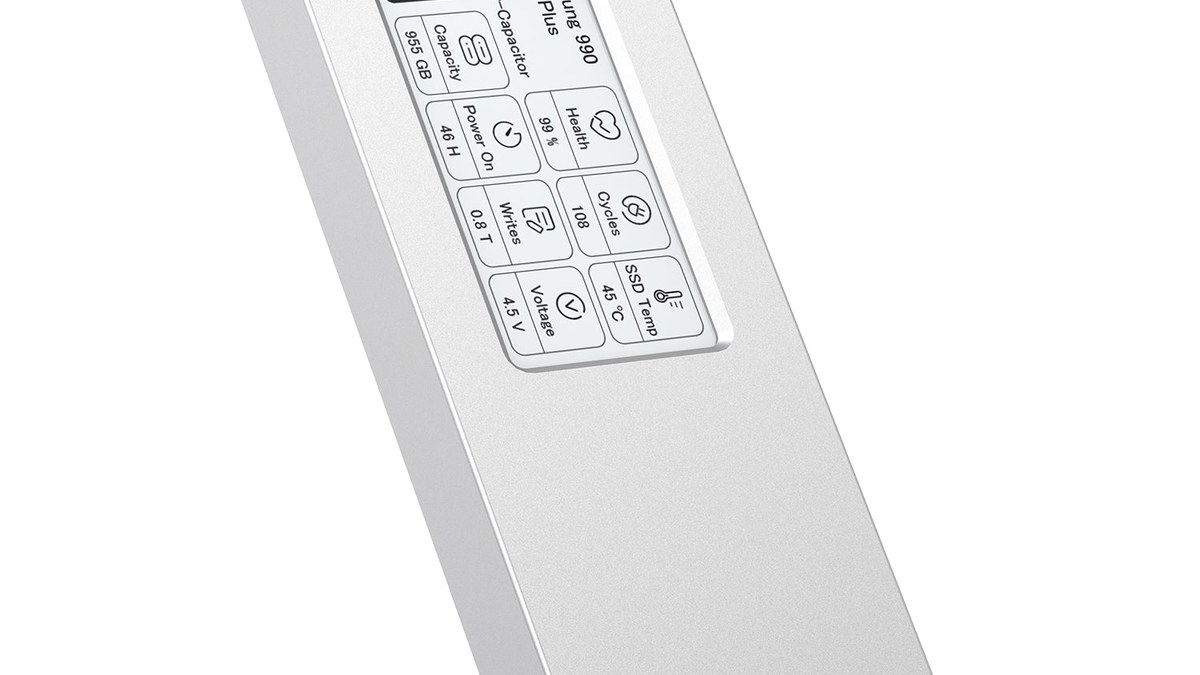
The panel woke up once it saw a drive and read out capacity, total power-on writes, input voltage, temperature, health percentage and the drive maker. Idle was 20 C. Health read 99%, and the capacity matched the 512GB Samsung I fitted. Leave it empty and the screen shows nothing, which is fair enough. There's no drive to report on.
One build note from my unit. The box had two identical screwdrivers and neither one fitted the Torx screws holding the case together, so I opened it with my own driver. Everything else is easy: pad on the drive, drive into the slot, four screws. That's a five-dollar annoyance, not a reason to send it back.
What 10Gbps means for 4K and 8K
10Gbps works out to roughly 1.2 GB/s on the wire before overhead, and a good enclosure in this class lands near 1,000 MB/s in real use. A 6.5GB copy took about five seconds. That's your ceiling. A Gen 4 drive won't make the case faster.
| Measure | Figure | Source |
|---|---|---|
| Sequential write | about 940 MB/s | measured, 5GB test |
| Sequential read | just under 900 MB/s | measured, 5GB test |
| Class ceiling | about 1,000 MB/s real world, ~1.2 GB/s raw at 10Gbps | USB 3.2 Gen 2 / arithmetic |
| Sustained write after cache | not measured | 5GB and 6.5GB tests only |
| 4K SDR upload bitrate for reference | 35-45 Mbps standard frame rate | YouTube |
| 8K SDR upload bitrate for reference | 80-160 Mbps | YouTube |
| 4K ProRes 422 HQ (derived) | about 880 Mbps | derived from Apple's 1080p figure |
One 4K stream is nothing to this. Delivery media at 45 Mbps or ProRes 422 HQ at roughly 880 Mbps both use a fraction of 900 MB/s, so scrubbing a 4K track is comfortable. Two or three in multicam looks fine on paper, but sustained reads are where a fanless case warms up, and I didn't run a long multicam session.
8K is where I stop being polite about it. Delivery 8K sits at 80-160 Mbps, which sounds small next to 900 MB/s until you're working with camera-original footage instead of an upload, and high frame rate 8K is several times heavier again. This is the job a 40Gbps USB4 enclosure is for. OWC's Express 1M2 is US$119.99 and rated to 3,836 MB/s, about four times what this case can move.
For card offload the case isn't the limit. A 64GB card empties in a bit over a minute at 940 MB/s, faster than most readers can feed it. If you'd rather not build a drive, a ready-made portable SSD is the other way to spend the same money.
Does the screen earn its place?
The panel reports heat. It doesn't remove any. Cooling is the aluminium shell plus the silicone pads you stick on the drive before it goes in, so fit them.
What the screen buys you is a reading with no host. Health percentage, temperature, power-on writes and capacity sit on the top face, so a drive in your bag can be checked before you plug it into anything. Every one of those fields exists in software on macOS and Windows too. The panel is convenience, not new information.
Three things I couldn't establish: how often the panel refreshes, whether the numbers move during a sustained transfer, and whether the image stays up once you pull the cable. Qwiizlab doesn't publish any of it and I didn't test it.
The supercapacitor is sold as drive protection, meaning enough stored charge to finish a write if power drops mid-transfer. No hold-up time is published, so treat it as insurance, not a guarantee. And if the enclosure never leaves your desk, the screen is decoration. A plain case at the same link speed does the same job.
Who should buy it, and who shouldn't
Three places the maths works. Card offload on the road, because at US$43.19 on Amazon.com you can carry two and still be under the price of one ready-made portable SSD. Turning a spare 2280 drive into something you can carry, which is the case where you already own the expensive half. And a scratch drive beside a Mac Studio, where a bus-powered case that reports its own temperature beats a bare one.
Two places it's the wrong buy. Editing sustained 8K or a heavy multicam timeline off the drive, where the link is the limit and the 40Gbps class above is the answer. And any job with a deadline you actually feel, because four times the speed is worth the extra money to anyone billing by the hour.
Check the region before you click. Same ASIN, B0HC2NKV85, US$43.19 on Amazon.com and CA$62.99 on Amazon.ca. Qwiizlab's own store had it at US$47.99 on sale against US$59.99 regular. If you're in Canada that's a wide gap for an identical box, so price both.
What would change my answer is a sustained write that shows the panel climbing under load with the pads fitted. Until then: a good cheap enclosure, and a screen worth having if the drive travels and worth ignoring if it doesn't.
Frequently Asked Questions
Will a SATA M.2 drive work in it?
The slot takes M-Key and B+M Key drives, and Qwiizlab lists NVMe PCIe and SATA support, so a SATA M.2 fits. It'll run near 550 MB/s though, well under what the 10Gbps link can carry, so buy an NVMe if you're buying.
What does the supercapacitor actually protect against?
It holds enough charge to finish an in-flight write if power is cut mid-transfer. That's what supercapacitor protection means here. No hold-up time is published, so it's insurance rather than a guarantee.
Will a fast Gen 4 or Gen 5 drive overheat in a fanless case?
20 C idle with a Samsung drive in my unit, and the box includes thermal pads that have to be fitted or the shell can't conduct heat away. I didn't run a long sustained write, so I can't tell you where it settles under load.
Does the panel need a battery?
No. It's bus-powered over USB-C and there's no battery in the listing, so the screen runs off the cable. Whether the last image stays up after you unplug isn't published and I didn't test it.
Can I use it with a USB-C iPad or iPhone?
It mounts as an ordinary USB-C storage device if the drive is formatted exFAT or APFS, which is what iOS reads. A power-hungry drive may need the iPad or phone on charge at the same time. Not tested on my unit.
Sources
- Qwiizlab ES19UE product page (specs, panel fields, box contents, price). checked 2026-11-23
- Amazon.com listing B0HC2NKV85 (US$43.19, no SSD included). checked 2026-11-23
- Amazon.ca listing B0HC2NKV85 (CA$62.99, same ASIN). checked 2026-11-23
- Greg Toope, 'Qwiizlab E-Ink SSD Enclosure: Worth It?' (measured speeds, panel readings, box hardware). 2026-11-11
- USB-IF USB 3.2 specification overview (10/20 Gbps rates). checked 2026-11-23
- OWC Express 1M2 USB4 enclosure (US$119.99, up to 3,836 MB/s). checked 2026-11-23
Get the Gear
Where to buy the Qwiizlab ES19UE e-ink SSD enclosure (enclosure only, no drive included):
Affiliate links — support the site at no extra cost to you.