
The Monokaro digital pin arrived with no charge in it. I pressed the button, nothing happened, and I plugged it in. That is an honest way to open a review of a gadget whose job is to be looked at: before it can show you anything, somebody has to remember it exists.
Is the Monokaro Digital Pin Cool or a Gimmick?
It is cool, and the reason does not depend on taste: it puts a screen where a screen has never been, at the size of a pin, doing one job. You pick the image on your phone, it appears on your chest, and if you change your mind on Tuesday you change the image instead of buying another pin.
The condition is that the flexibility is yours to supply. The hardware gives you the screen and the app gives you the upload path; it does not give you a reason to wear it. That is why it is a real product for a cosplay build, a convention badge or a changing logo at a meetup, and a drawer ornament for anyone who wants one permanent image.
For that second person a printed pin is the stronger piece of technology: a few dollars, no charging, and nothing that can fail. The digital pin wins the moment the image has to change without a print order.
What It Is, and What's in the Box
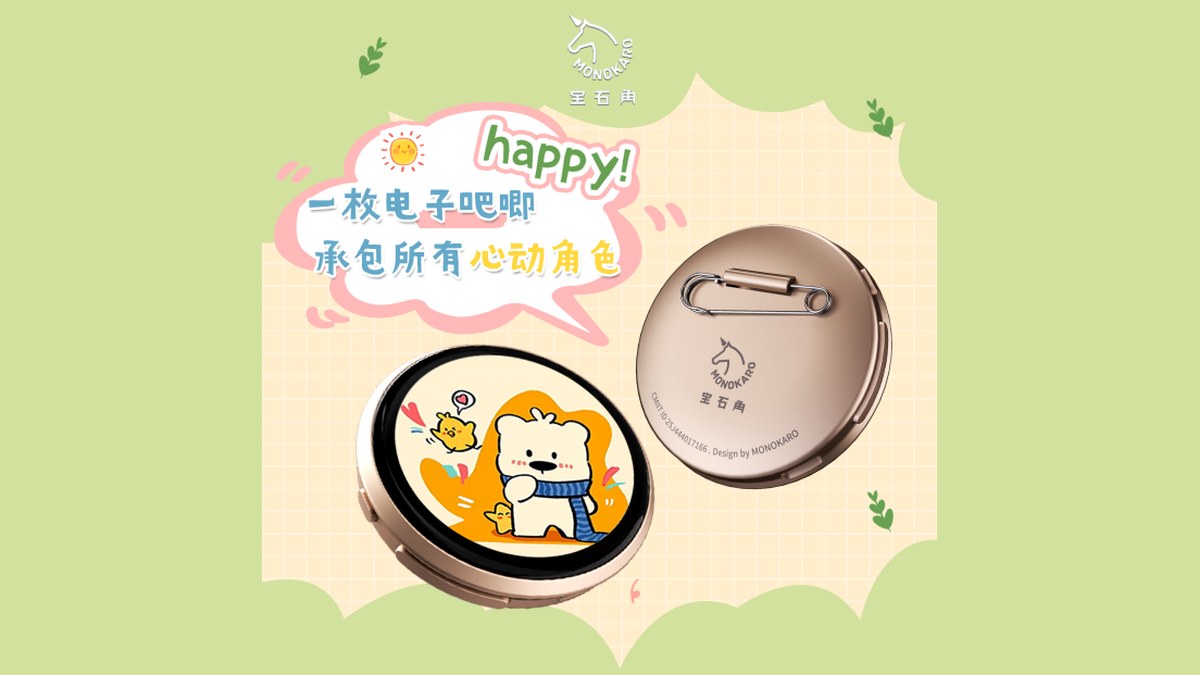
Strip the marketing and it is a round touchscreen with a battery and a pin on the back. The box holds the badge, a short USB-A to USB-C cable and a printed manual that doubles as the app download because it carries the QR code. No wall adapter, no spare pin back, no pouch. Note the cable: the device end is USB-C and the other end is USB-A, so the C-to-C cable on your desk is not the one that ships.
Two things worth knowing before the table. There is no consumer spec sheet anywhere, because Monokaro's own site is a Shenzhen business-to-business page with an Inquire Now button and no consumer specifications. Every figure below comes from the brand's own Amazon listings or the two app store pages, and the table says how firm each one is. And the first surprise was physical: at 58 mm across it is bigger in person than the product photos suggest, and on a jacket it reads as a statement rather than a lapel detail.
| Spec | Published value | How solid it is |
|---|---|---|
| Screen | 1.85 in (4.7 cm) round HD IPS touchscreen with curved glass | Manufacturer claim, consistent across both listings |
| Resolution | Not published, including on both app store pages | Missing; the competing NIKKO badge publishes 360x360 and this one publishes nothing |
| Body | 58 mm (2.28 in) across, 9.9 mm (0.39 in) thick, 32 g (1.1 oz), metallic-finish ABS back with a pin back | Manufacturer claim |
| Battery | 500 mAh rechargeable, advertised 8 to 18 hours of screen-on time | Manufacturer claim; the width of that range is the story |
| Brightness | Four levels plus a sleep mode | Manufacturer claim, visible on camera |
| Charging | USB-C on the device, USB-A to USB-C cable in the box, charge time not published | Cable confirmed first-hand, time missing everywhere |
| Connectivity | Bluetooth 5.4 to the app, with badge-to-badge image transfer | Manufacturer claim |
| Storage | 50 photos, 10 GIFs and 3 videos on the badge | Manufacturer claim, repeated on both listings |
| App | Monokaro by Rubyoung, free, iOS 15.0 or later at 69.6 MB, Android with 1K+ installs, no account and no data collected | Verified from both store pages |
Getting an Image Onto It
The workflow is four taps: pick the file, drag it inside the circle so the part you care about survives the crop, add a caption or sticker if you want one, upload. It is short enough that I stopped thinking about it after the second image. A single still takes roughly a minute including the crop, which is the number that decides whether you actually change the face or leave it on the same logo for a month.
Two behaviours surprise people. The button on the front is not a power button, and pressing it does not wake the badge into pairing; the pairing prompt appears when the app starts an upload, so a badge that looks dead is usually just unpaired or flat. And the app is more than photos: it carries text tools and a scrolling marquee, so the badge can say something instead of showing something, which is more useful for a name tag than a photo is.
Content support is photos, GIFs and short videos, plus a slideshow mode and a cheer-light animation. Video trimming was added to the app on October 23, 2026, so a clip can be cut before it goes on the badge rather than after.
Battery, Durability and the Specs That Aren't There
A badge with a lit screen is a small phone with one job, so the arithmetic is familiar: a 500 mAh cell running a 1.85 in display gets nowhere near a week. Monokaro advertises 8 to 18 hours of screen-on time, and that ten-hour spread is not laziness, it is the manufacturer telling you the number depends on brightness and how much the content animates. Four brightness levels are the lever. Charge time to full is not published and I have not measured it, so budget an evening rather than a coffee break.
The bigger omission is durability. There is no water rating, no dust rating, no impact rating and no drop figure on either listing. The only guidance anywhere is a care note on the Canadian listing telling you to avoid direct sunlight and liquids, which is an instruction rather than a specification. A round glass screen pinned to the front of your body will meet rain, a spilled drink and a doorframe, and nothing in the product documentation says what happens when it does.
Two smaller gaps worth naming: the screen resolution is unpublished while a direct competitor publishes its own, and there is no camera or microphone on the unit, which is worth saying plainly because the form factor invites the question. Nothing in either listing, either app description or on the device itself suggests it records anything.
Who It's For, and What It Costs
The listing names its audience clearly: anime and ACG fans, ita-bags, cosplay, badge rosettes, conventions and concerts, with a gift angle and a cheer-light mode for sports. That is a coherent group and it is not most people who end up reading a review like this, so separate the two cases. For a convention or cosplay build the badge earns its keep immediately, because the face changes with the outfit. For everyday wear the case is thinner, and it comes down to how often you actually want a different image.
Price is $31.99 USD or $48.29 CAD for one device, against roughly $2.57 to $3.39 each for a printed enamel pin at 100 units and $5 to $7 each in small runs. That comparison is the whole argument, and it is not about which is better made.
| Monokaro digital pin | Printed enamel pin | Phone screen | |
|---|---|---|---|
| Cost | $31.99 USD / $48.29 CAD | About $2.57-$3.39 each at 100 units, $5-$7 in small runs | Nothing if you own the phone |
| Change the image | Yes, in about a minute, up to 50 photos, 10 GIFs and 3 videos stored | No; one fixed design per order, usually 100 units minimum | Yes, instantly, much larger |
| Needs charging | Yes, 500 mAh, claimed 8 to 18 hours | No, never | Yes, bigger battery |
| Durability | No rating; care note says avoid liquids and sunlight | Metal and enamel, survives a washing machine in most cases | Fragile and expensive to replace |
| Best for | Someone who changes what they display more than a few times a year | One design worn for years | Showing anything to anyone, at any size |
My recommendation is narrow and easy to apply. Buy it if the image is the point and it will change, and treat the lack of any water or impact rating as a real constraint on where you wear it. If you want one image on a backpack forever, buy the enamel pin and spend the difference on something that needs no charging.
Frequently Asked Questions
What is a Monokaro digital pin?
A round badge with a 1.85 in IPS touchscreen, worn on a jacket or bag like a normal pin. It is 58 mm across, 9.9 mm thick and 32 g, with a pin back and a Bluetooth link to a phone app.
Does it have a camera or record video of me?
No. There is no camera and no microphone listed on either Amazon listing, in either app description, or visible on the unit.
How long does the battery last?
Monokaro claims 8 to 18 hours of screen-on time from a 500 mAh cell. The range is wide because brightness and animation are the variables, and charge time is not published.
Is it waterproof?
No water, dust, impact or drop rating exists on either listing. The only guidance is a care note to avoid liquids and direct sunlight.
Does it work with iPhone and Android?
Both. The app is free on each store, needs iOS 15.0 or later on iPhone, and collects no data and requires no account.
Sources
- Monokaro official product page, Electronic Badge Pin-Style (PG11913145). Manufacturer page for the badge itself; confirms it is sold as a B2B/custom product and publishes no screen, battery or water-resistance spec sheet, which is why those rows in this review read "not published".
- Monokaro Digital Pin listing, Amazon.com (Monokaro store, ASIN B0GHFM7M3N). 1.85-inch round HD IPS touchscreen with curved glass, 58 mm body, 9.9 mm thick, 32 g, Bluetooth 5.4, pin-back, five display modes. Read 2026-11-21.
- Monokaro Digital Pin listing, Amazon.ca (ASIN B0GL258PSW). Canadian price $48.29 CAD including a $2.30 import fees deposit, plus the care note that says avoid liquids and direct sunlight. Read 2026-11-21.
- Monokaro app, App Store (developer Rubyoung). iOS 15.0 or later, 69.6 MB, no account, no data collected, version 3.2.6. Version 3.2.5 on Oct 23 2026 added video trimming and a scrolling text marquee.
- Monokaro app, Google Play (com.rubyoung.monokaro). Android availability, 1K+ installs, updated Oct 28 2026.
- Greg Toope, "Monokaro Digital Pin First Look: Cool or Gimmick?" (video A4gx-yCpfXE, published 2026-11-20, verified public via YouTube Data API). First-hand source for the unboxing, the dead-on-arrival battery, the Bluetooth button, the pairing-by-upload behaviour, the uploads, and the verdict.
- NIKKO Dynamic Electronic Badge listing, Droix. Competing digital pin: 1.8-inch 360x360 IPS, 500 mAh, 8-16 hours, $25.95-$29.95 USD. Used for the category comparison only.
- myenamelpins.com, custom enamel pin pricing. Soft enamel $2.57-$3.39 per pin at 100 units, small orders $5-$7 per pin, 100-unit minimum. The printed-pin side of the comparison.
- Metro Pins, custom lapel pin price charts. Per-process price charts for photoscreen, soft enamel, hard enamel and die-struck pins, with 30-day regular or 15-day rush delivery.