

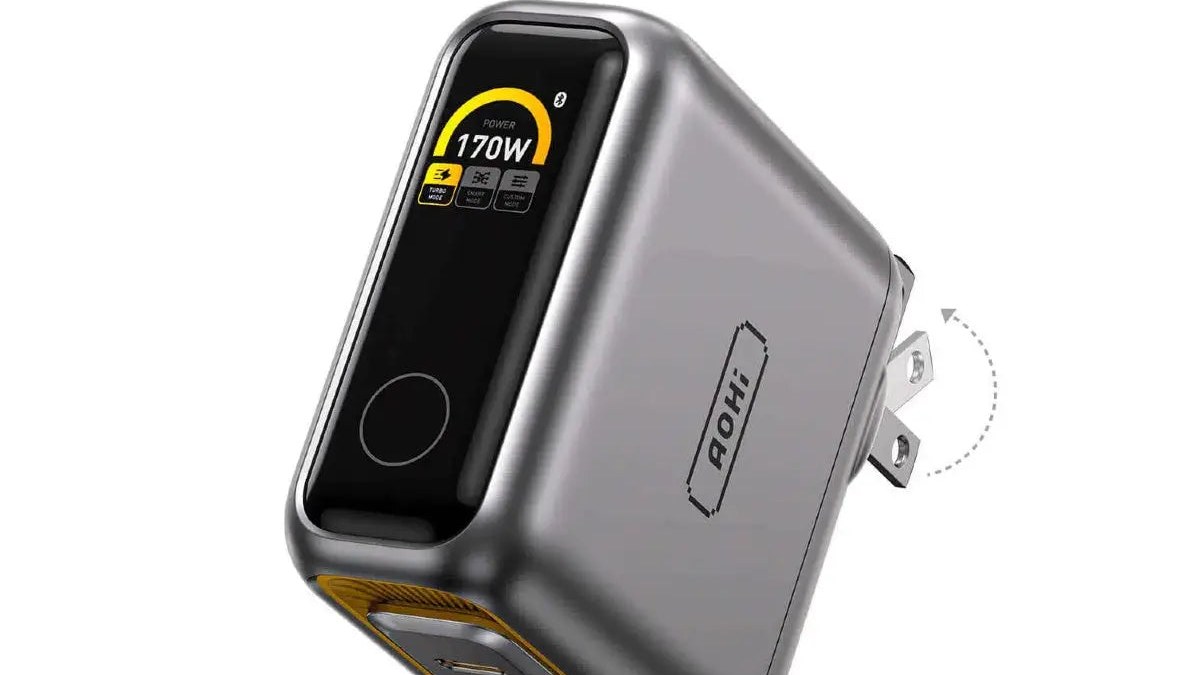
The AOHI 170W (model AOC-C024) is a three-port GaN wall charger with a colour screen that shows what each port is pulling, and it costs $99.99 USD on sale. The screen is the useful part: it answers which device is actually getting the watts, the question every multi-port charger leaves you guessing at. The app is the weak part, and "AI" in the name means automatic power distribution across the 170W budget, not a feature you can point at.
AOHI sent this one to the channel and it's been on my desk for a few days. No USB meter touched it, so every wattage figure below is the charger reporting on itself. That's enough to prove a port is working. It's not an independent measurement, and I'm not going to pretend otherwise.
What you actually get
Three ports: two USB-C and one USB-A, in a grey brick with a foldable plug. USB-C1 and USB-C2 are rated to 140W each on their own. The USB-A port is 30W. The whole thing is capped at 170W total, and that last number is the one people get wrong.
Two 140W ports does not mean 280W together. Combined output is 170W, so 140W is only reachable on one port at a time. Whether that matters depends on your machine. Most 14 and 15 inch laptops sit around 90 to 100W and only the 16-inch class goes higher. If you're working out what your own laptop needs, that's the number to start from.
| Spec | What AOHI publishes | Status |
|---|---|---|
| Ports | 2 x USB-C plus 1 x USB-A | Manufacturer claim |
| Per-port maximum | 140W USB-C1, 140W USB-C2, 30W USB-A | Manufacturer claim |
| Total output | 170W shared; 140W max through one USB-C port | Manufacturer claim |
| Turbo ceiling | Up to 100W plus 100W at the same time | Manufacturer claim |
| Modes | Turbo, Smart, Manual | Manufacturer claim |
| Display | TFT LCD, per-port output, temperature, active mode | Manufacturer claim |
| App | AOHi App over Bluetooth | Manufacturer claim |
| Input | 100-240V, 50/60Hz, 3A | Manufacturer claim |
| Size and weight | 45 x 38 x 75 mm, 337 g, foldable plug | Manufacturer claim |
| Price, 22 Nov 2026 | $99.99 USD on sale from $139.99 USD | Verified, dated |
AOHI publishes no split table for simultaneous loads, so nobody can tell you what each port gets when all three are full. The 100W plus 100W Turbo figure is the honest reason this unit exists next to a 140W brick.
In the hand it's not the smallest charger I've used, but the plug folds away and that matters in a backpack pocket. I'm also glad they kept the USB-A port. I still carry USB-A accessories and 30W covers them.
What the screen and app are for
Here's the thing a plain charger can't do. Put a laptop, a camera and a phone on a 140W brick and one of them silently gets less than it asked for. You never find out which. With this you can see it, and Manual mode decides who wins.
What the display shows while you charge
The TFT LCD shows each port's output, unit temperature and the active mode. One button on the body pages through the readings. On my unit that button was the only way to see the per-port number, because the display doesn't cycle on its own.
A device pulling less than its rating is normal. The device decides what it draws, so a phone at 80% takes a fraction of what it took at 20%. A port's figure also drops the moment you add another device, because the charger redistributes inside the 170W budget. AOHI says as much on its own FAQ page.
The app is where Turbo, Smart and Manual live, along with switching ports on and off and reading live power. AOHI's page says Bluetooth with no Wi-Fi or cloud needed. The App Store and Google Play listings both mention Wi-Fi. The sources disagree and I'm not going to pick one and call it right. My session was Bluetooth.
It's also the weakest thing about the product by public rating: 1.3 out of 5 from 13 ratings on the App Store, and 1.8 stars from 31 reviews on Google Play with over 1,000 downloads, both checked 22 November 2026. The complaints are pairing failures and account problems. One 31 October 2026 review says it paired immediately and updated firmware in seconds. My read: useful, not required. The charger works without it.
Charging a camera and a laptop at the same time
So here's what I actually ran. A camera on one USB-C port through its battery handle ramped and settled around 10W. Adding a laptop on the second port pushed the total past 60W and the display tracked it live. That's the travel lesson right there. A camera draws almost nothing next to a laptop, and the screen's real value is confirming the camera is charging at all. Cameras are fussy about chargers, which is why matching the right charger to something like an Insta360 X6 matters.
Two laptops is the constraint case, not a camera and a laptop. In Manual mode you can hand one 100W and the other 40W, which is exactly what I'd do with two 140W machines and one charger in the bag.
Against a plain 140W brick
The cleanest comparison is inside AOHI's own catalogue. The same company sells a three-port 140W brick for $20 USD less, and another for $40 less. Both are what you buy if the screen isn't worth paying for.
| AOHI 170W AI | MagCube Pro 140W | The Youth 140W | |
|---|---|---|---|
| Total output | 170W | 140W | 140W |
| Ports | 2 x USB-C + 1 x USB-A | 2 x USB-C + 1 x USB-A | 2 x USB-C + 1 x USB-A |
| Per-port maximum | 140W / 140W / 30W | 140W / 140W / not stated | 140W / 100W / 22.5W |
| Live wattage readout | TFT LCD, per port, plus temperature and mode | Three-colour LED only | Three-colour LED only |
| App control | Yes, Bluetooth: modes, port on/off, live power | No | No |
| Firmware updates | Yes, upgradable PDO support | Not stated on page | Not stated on page |
| Weight | 337 g | About 306 g | About 306 g |
| Price, 22 Nov 2026 (USD) | $99.99 sale / $139.99 list | $79.99 sale / $129.99 list | $59.99 sale / $99.99 list |
That $20 buys 30W of headroom plus the display, and the headroom is the harder thing to find elsewhere. A 140W brick can't hand out 100W twice because its whole budget is 140W, so with two high-draw laptops one of them waits. That's the one situation this charger handles and a 140W unit can't.
The display earns its keep in that same scenario, just more quietly. On a 140W brick the camera gets whatever is left and you can't see it. Here the number sits on the front and Manual mode sets priority. That's diagnostic value, not extra speed.
Where the 170W loses is weight and simplicity. At 337 g it's roughly 30 g heavier than the MagCube, which is the wrong direction for something that lives in a bag. And the 140W bricks need no app, no pairing and no account. AOHI publishes no volume for the 170W, so weight is the only size comparison the numbers actually support.
Firmware is the last real difference. AOHI states upgradable PDO support, and I've watched firmware land on the 280W unit I already own. Neither 140W page says anything either way, and that's not the same as those units lacking it.
So should you buy it?
If you've plugged two demanding devices into one brick and wondered which one was being starved, this charger answers it, and the 170W budget means the answer doesn't cost you a charge. If you haven't, buy the cheaper brick and put the difference into a cable that can actually carry the wattage. The box doesn't include one.
Mine stays in the bag. It replaced two adapters on my last trip and ended the guessing about whether the camera was taking a charge at all.
Frequently Asked Questions
Does the AOHI 170W come with a USB-C cable?
No. The box has the charger, a gift box and a manual. Reaching the top wattage needs a USB-C cable rated for it, bought separately.
Will it work on a 120V Canadian outlet?
Yes. The input is rated 100-240V at 3A, which covers North American 120V service, and the plug is the foldable US type. On 230V travel supply it only needs a plug adapter.
What warranty does it carry?
18 months, with lifetime customer support per AOHI's product page.
Can two laptops each pull 140W at the same time?
No. The unit caps at 170W total, so the Turbo ceiling is 100W plus 100W. Full 140W is only available to a single USB-C port.
How fast does it charge a 16-inch MacBook Pro?
AOHI quotes 0 to 56% in 30 minutes with a PD 3.1-capable MacBook Pro and a matching high-power cable. That's their figure, not my measurement.
Can I buy it in Canada, and in what currency?
The AOHI store ships to Canada but prices the order in USD, and AOHI also runs an Amazon.ca storefront. I didn't verify a Canadian dollar price, so check the total at checkout.
Sources
- AOHi official product page, The Future AI PD3.2 170W 3-Port LED Display Wall Charger (AOC-C024).
- Greg Toope, This Wall Charger Has a Screen AND an App? AOHI 170W AI Charger Review (first-hand hands-on).
- AOHI app, App Store listing (ratings and review themes, checked 22 Nov 2026).
- AOHI app, Google Play listing (ratings and review themes, checked 22 Nov 2026).
- AOHi MagCube Pro 140W GaN+ 2C1A page (comparison, price checked 22 Nov 2026).
- AOHi The Youth 140W PD3.1 GaN 3-Port page (comparison, price checked 22 Nov 2026).
Get the Gear
Where to buy the AOHI 170W AI charger:
Affiliate links — support the site at no extra cost to you.